

















Trying and publishing a quiz
Shoppers see the last published version of a quiz. You work on a draft, try it privately, let the module check it, and publish it when you are happy.
Draft and published
- Every change in the workspace saves by itself, one change at a time, into the draft.
- Shoppers see the last published version. Publish (or Publish changes for a quiz that is already live) puts the draft live.
- A quiz is published in every active language of the shop installation, so a quiz published from a shop with one language keeps the copies another shop needs.
- Discard unpublished changes goes back to the published version (Discard unpublished changes).
Some things take effect at once and are no part of the draft: Pause and Resume, the shops of a quiz, its address, the category banners and everything under Settings in the navigation.
Try it
Try it runs the saved draft privately in the workspace. You pick answers as a shopper would and see what the quiz recommends, and why. Nothing is stored, so a trial changes no report.
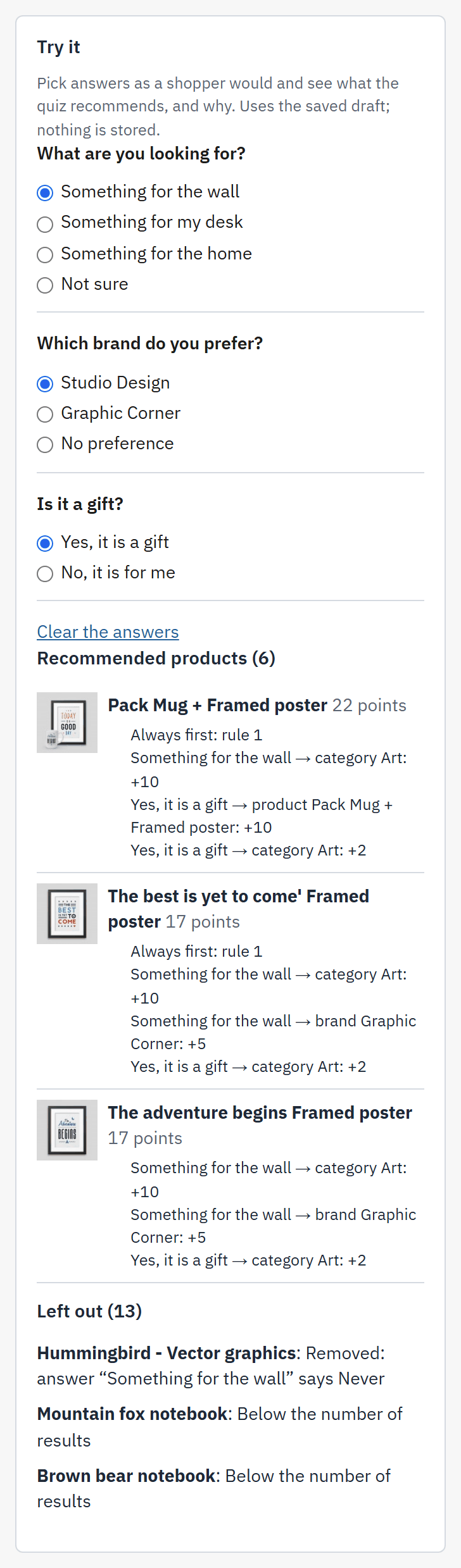
- The questions, answered as a shopper would.
- The ranked products and their points.
- The reason for one product: each contribution, such as the category an answer recommended.
- Left out ({count}): products that scored but are not shown, with the reason.
- Open the workspace and press Try it, in the header or in the right column.
- Answer the questions shown. Answer every question shown to see the full result.
- Read the products and their reasons. Change an answer and read again.
For each product Try it shows its total and every contribution, for example an answer recommending its category as Strong. It also shows the effect of rules: Always first: rule {n} for a product a rule put first, Removed: Never rule {n} for one a rule removed, and Removed: answer “{answer}” says Never for one an answer excluded. Products that scored but were left out are listed with the reason, among them:
- Its total is 0 points or less;
- The product is disabled;
- Hidden from the catalogue;
- Not sold in this shop;
- Out of stock (this quiz hides those);
- Below the number of results.
Preview on the shop
Preview on shop opens the draft on your storefront, exactly as a shopper would see it, for employees who are logged in to the back office. The page carries a ribbon, Preview, not saved, and nothing a tester answers is stored. The link is private and short-lived: it expires after about 30 minutes.
The publish checks
Before publishing, the module checks the quiz. Press Check this quiz at any time to see the result.
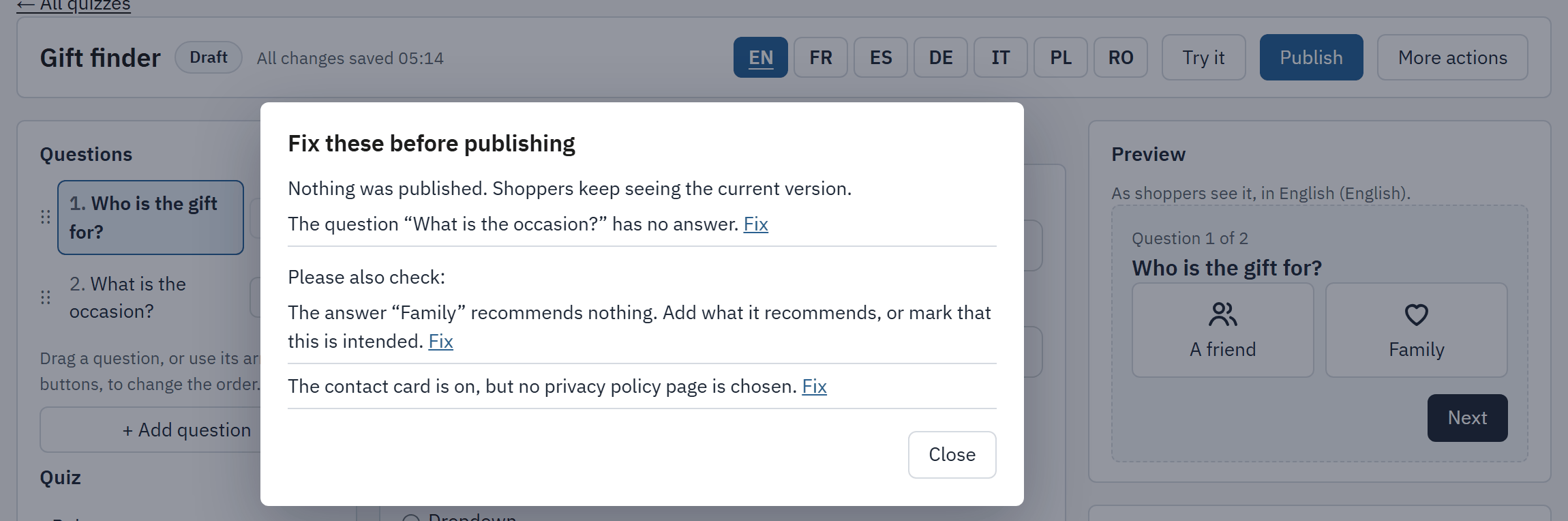
- Fix these before publishing: the problems that block publication.
- The quiz works, but please check:: the warnings. When a problem that blocks publication is also present, the heading reads Please also check: instead.
- Fix: opens the place where the problem is.
- Publish.
| Kind | What is found |
|---|---|
| Blocking | No question; a question with no answer; a number of results of 0; a question whose condition names an answer that no longer exists or belongs to a later question; no name or no address. |
| Warning | An answer that recommends nothing and is not marked as intended; a quiz in which no answer recommends anything; a rule that can never apply; a row or a rule whose target is missing or selects no product; a text missing in an active language; the contact card is on and no privacy policy page is chosen. |
A blocking problem keeps Publish from working until you fix it. With only warnings, the module asks Publish with these warnings? and lists them; choose Publish anyway to go on, or Fix to correct them first.
Publish
- Press Publish in the header. For a quiz that is already live, the button reads Publish changes.
- Read the checks. Fix what blocks, and decide about the warnings.
- The module publishes: “Published. Shoppers now see this version.”
If some changes are not saved yet, nothing is published and shoppers keep seeing the current version. Check the message on the screen, then try again. The first publication also switches the quiz on. To take it off the shop later, use Pause.
After publishing, show the quiz to shoppers with Where a quiz shows.
Discard unpublished changes
Discard unpublished changes, in the header menu, rebuilds the draft from the published version. The module first asks you to confirm, naming the number of changes. Everything you changed since the last publication is lost and this cannot be undone.
- A quiz that was never published has nothing to discard.
- A question deleted since the last publication comes back in the published languages only, the languages of the last publish. The texts of a language added since have to be written again.
- The address, the shops and Pause are not part of the draft, so discarding leaves them alone.
Two people on one quiz
If a second person changes the same quiz, a change sent from an out-of-date copy is refused with the message “This quiz was changed somewhere else. Reload to see the current version.” Press Reload to load the current version, then redo your change. The same applies to Publish: nobody overwrites another person's work without being told.