

















Multistore, roles and personal data
How the module behaves with several shops, what each employee role may do, and what happens to shoppers' personal data.
Multistore
The module works in one shop, in a shop group and in All shops.
- The lists show the quizzes, contacts and results of every shop you selected in the shop list at the top of the page.
- Each quiz belongs to one or more shops. Shops in the settings of a quiz decides which (Settings of a quiz). A new quiz belongs to the shops you are editing when you create it; a quiz upgraded from 1.x belongs to every shop.
- Duplicate puts the copy in the shops you are editing. Delete of a quiz that other shops also use asks you to delete it from All shops.
- A quiz that is not in the shops you are editing is not shown. To edit a quiz of another shop, choose that shop or All shops at the top of the back office.
- Settings can be saved for all shops, a group or one shop (Settings in a multistore).
- The example quiz belongs to the shop whose catalogue it was built from.
- An employee who is restricted to one shop can still edit, publish and pause a quiz that is shared with other shops, and the change reaches every shop of the quiz.
Roles
One set of permissions governs every page and action of the module: those of the Product Quiz entry, set in Advanced Parameters › Team › Permissions. A super administrator always has them all.
| Permission | What the employee can do |
|---|---|
| View | Open the module, read quizzes, lists, reports and settings, and use Try it. Settings show a notice that changing them needs the edit permission. |
| Edit | Change quizzes, publish, pause, handle contacts and save settings. Searching the catalogue for what to recommend also needs this permission. |
| Add | Create a quiz, create the example quiz and duplicate a quiz. |
| Delete | Delete a quiz, a contact or a completed quiz. |
An employee without view permission sees a message saying so. One with view permission only sees a quiz in the workspace but cannot change it.
Personal data and GDPR
| Data | Where it comes from |
|---|---|
| A completed quiz | The answers, the results and the language. |
| A contact | The email, the phone number and the newsletter choice the shopper gave. |
| The visitor's address | Kept only as a salted hash, to limit how often one visitor may submit. |
- After the retention period (Contact and privacy), the module deletes the contacts and removes the customer link and the hash from older completed quizzes.
- For a shopper's request to see or erase their data, the module answers PrestaShop's GDPR module: its export and its deletion cover the contacts and completed quizzes of that customer, by customer account and by email.
- The contact card has its own privacy link and newsletter box. The consent switch of PrestaShop's GDPR module for “Product Quiz” does not apply to the quiz, and the contact's consent is not recorded in that module.
- The newsletter box is separate from the contact: a ticked box is handed to PrestaShop's newsletter module, which applies its own confirmation.
- Uninstalling the module deletes all of its data (Reset and uninstall).
Known limits
What the module does not do, or does in a way you may not expect, in version 2.0.0. None of it loses data in normal use.
Limits of the module
- On MySQL 5.7, after a database restart an answer number can be given again inside the same quiz, and the Answer filter of Completed quizzes then matches old completions to the new answer. For up to the shop's time-zone offset after a quiz is created, an older completion of a reused quiz number can show as “Deleted quiz (#12)”.
- On a shop very close to its PHP memory limit, a memory error can end an export file without its last line. The export then says it is incomplete: export again.
- A retention above 120 months, possible only by editing the setting by hand, is read as invalid and deletes nothing.
- A quiz whose only shop was deleted is no longer shown anywhere.
- The summary of a preview travels in the address, so the address can get long.
- The preview works only on the shop address that the back office is logged in on. On another address it shows nothing.
- Where PHP runs without PHP-FPM or LiteSpeed (Apache's mod_php), the staff email is sent before the shopper's answer. A mail server that does not answer then delays the shopper by about twenty seconds.
- The module page reads every quiz's draft to count its problems, so it takes longer to open on a shop with very many quizzes.
- A category banner repeats on page 2 and later of the category.
- The GDPR module's CSV export does not neutralise formulas, so a shopper's text in it can act as a formula when the file is opened in a spreadsheet. The module's own exports are safe.
- The GDPR module's consent switch for “Product Quiz” does not apply to the quiz (Personal data and GDPR).
- A language added later starts with the texts of the shop's default language until you write its texts and publish again.
Known PrestaShop issues
- PrestaShop 9's
themes/core.jsruns product-page code when you press Back or Forward to a page that has saved state. The quiz keeps its place in the address instead, so Back and Forward work. - Classic's grey text, grey fields and light blue buttons and links do not reach AA contrast on their own. Choose an accent colour in Look to give the quiz's buttons a stronger colour.
- Reset in Module Manager deletes the module's data (Reset and uninstall).
- The GDPR module (psgdpr) 1.4.3 has a back-office screen that fails on PrestaShop 9: update psgdpr or use 2.x.
- psgdpr 2.0.1 can fail with an error when it deletes a customer (psgdpr issue 253): update psgdpr when a fix is out.
- psgdpr 2.x sends no email to the customer after deleting an account.
Troubleshooting and support
Start with the Checklist: most problems show up there with a reason and a Fix link. The module writes its errors to the PrestaShop log, under Advanced Parameters › Logs.
Common questions
Shoppers do not see my quiz
Check, in this order: the quiz is published and is not Draft or Paused (The list of quizzes); it belongs to the shop the shopper is on (Settings of a quiz); you cleared the cache in Advanced Parameters › Performance after an update. The Checklist says when no quiz is live.
My changes do not show on the shop
Shoppers see the last published version. A quiz marked Live with unpublished changes needs Publish changes (Publish).
Publish is refused
Read Fix these before publishing: a blocking problem, such as a question with no answer, must be fixed first. Press Fix to go to it (The publish checks).
"This quiz was changed somewhere else"
Another person, or another tab of yours, changed the quiz. Press Reload and redo your change (Two people on one quiz).
The home page shows no banner
The quiz chosen in Home page banner must be live in this shop. A paused, unpublished or deleted quiz, or one that is not in the shop, shows nothing, and the checklist says so (The home page banner).
A category page shows no banner
Choose the category in Other places and save. The quiz must be live in the shop, and when several quizzes choose the same category, the oldest one shows (Other places).
I get no email when someone leaves details
Check Email the staff about new contacts and the Staff addresses in Notifications. The contact is saved in People to contact even when the email fails; the reason is in the PrestaShop log. Also check that the contact card of the quiz is not Off.
The newsletter box is missing
The box is offered only when the Newsletter subscription module (ps_emailsubscription) is installed and enabled. The checklist names the problem when the box is on but the module is not (Contact and privacy).
A recommended product does not appear
Use Try it: the products left out are listed with the reason, for example disabled, hidden from the catalogue, not sold in this shop, or out of stock when the quiz hides those (Try it).
The preview shows nothing or "not found"
The preview link works for logged-in employees, for about 30 minutes, on the address the back office is logged in on. Open the back office on that address and try again (Preview on the shop).
The export file opens in one column
If your spreadsheet opens the file in one column, use Data > From Text/CSV and choose comma.
I pressed Reset and lost my quizzes
Reset deletes the module's data on PrestaShop 8 and 9. Restore a database backup if you have one. To update, upload the zip (Upgrade from version 1.5).
The Help section of the module
Help in the top bar opens Documentation, a short help page inside the module.
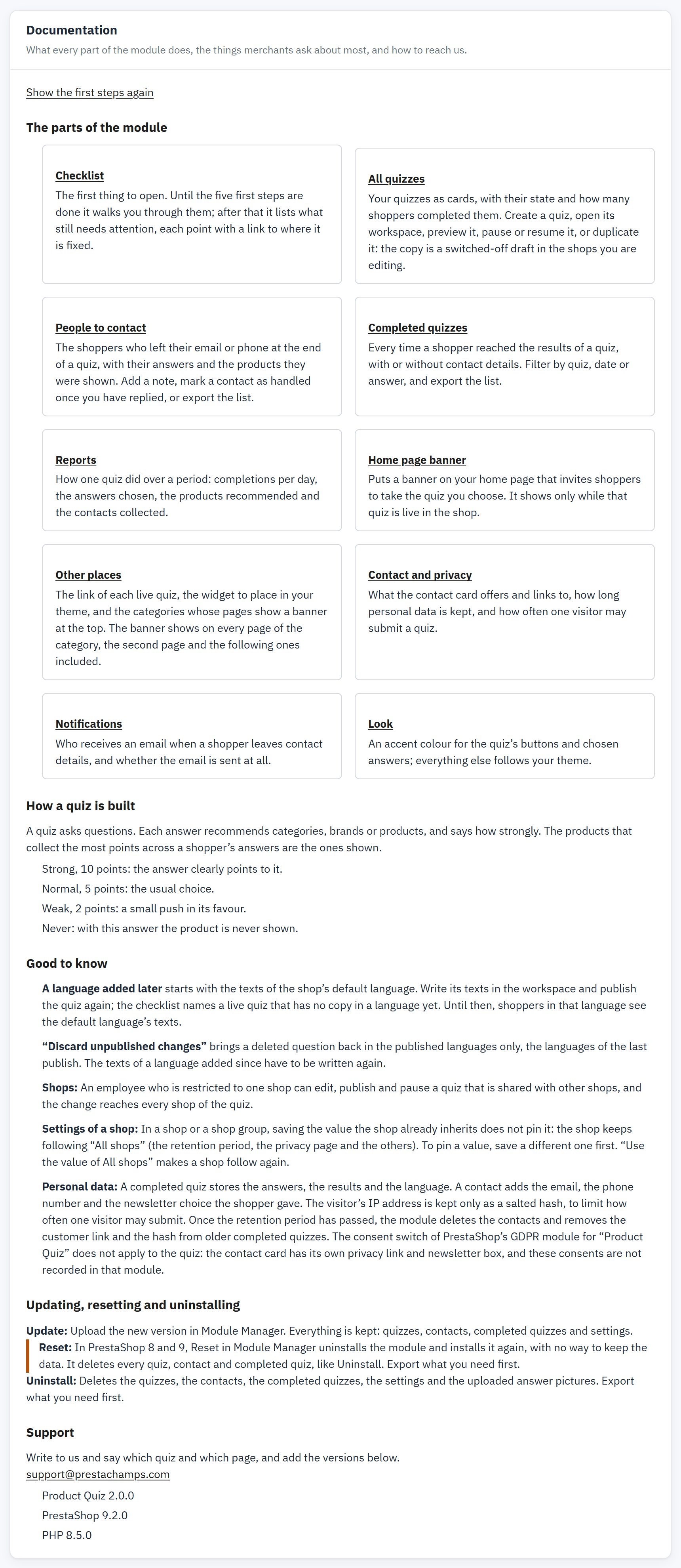
- Show the first steps again.
- The parts of the module, each linking to its section.
- Good to know.
- Support, with the versions in use.
It explains each part of the module in plain words, how a quiz is built, the notes merchants meet most, and what updating, resetting and uninstalling do to the data.
Contact support
Contact us through PrestaShop Addons: use the messaging on the module’s page in your Addons account. Say which quiz and which page, and add the versions listed at the bottom of Documentation: the version of Product Quiz, of PrestaShop and of PHP. A screenshot of the problem and the relevant lines of the PrestaShop log help us answer quickly.